



Bring your own cloud
Facthory runs inside your cloud account
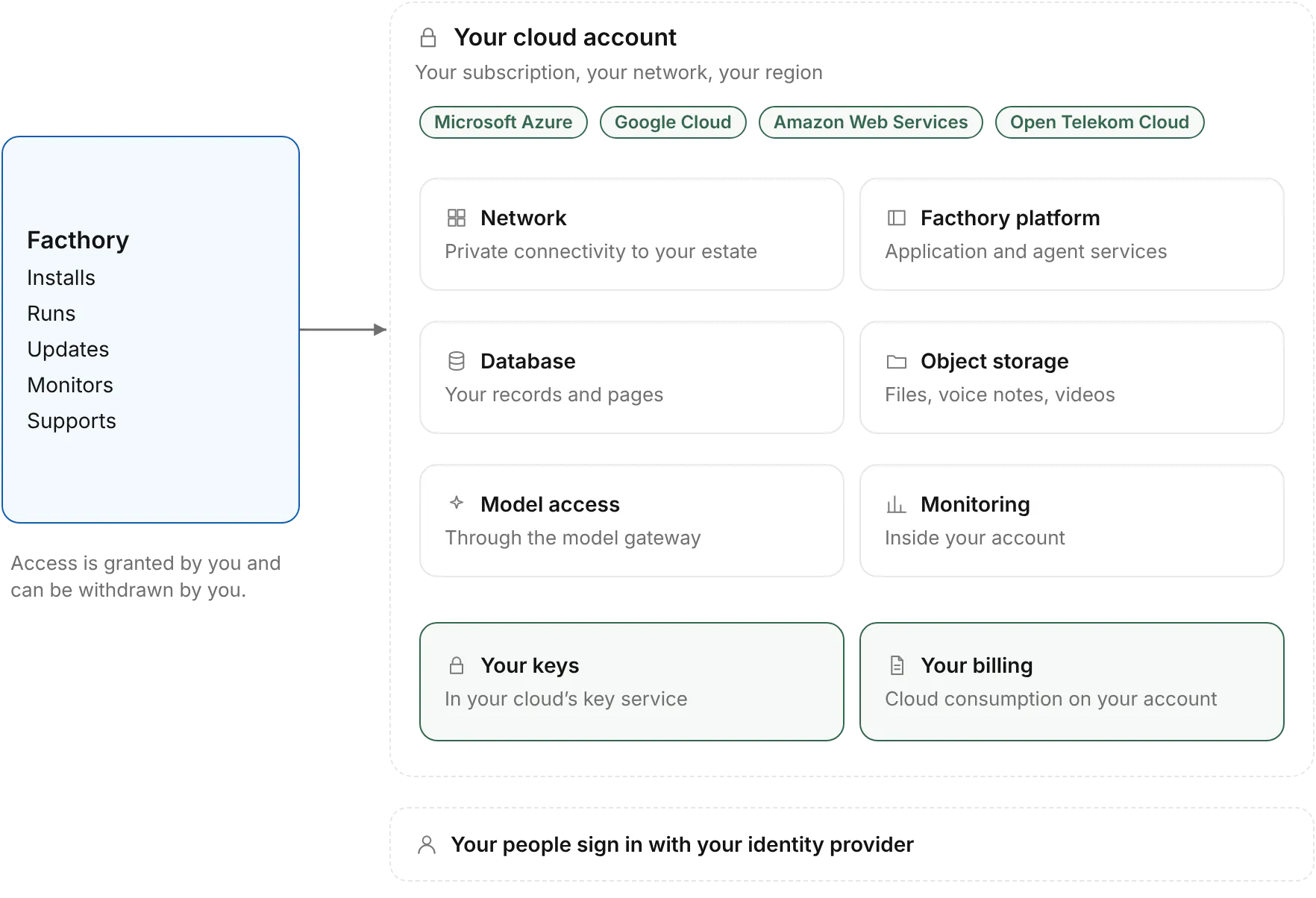
You bring the cloud account. Facthory installs and runs the platform there, so your network policy, your region, your keys and your billing stay where your other workloads already are.
Four clouds
Facthory installs the platform on the cloud your organization already uses.
| Cloud | Provider |
|---|---|
| Microsoft Azure | Microsoft |
| Google Cloud | |
| Amazon Web Services | Amazon |
| Open Telekom Cloud (OTC) | T-Systems |
What Facthory does
Facthory carries the operation inside your account, with the access you grant.
- Installs the platform: network, application and agent services, database, object storage, model access and monitoring.
- Runs it day to day and updates it.
- Monitors it, with the monitoring inside your account.
- Supports your team, in your account.
You grant the access and you can withdraw it.
What stays yours
- The account and the network. Your subscription, your network policy and private connectivity to the rest of your estate.
- The region. Your data lives in the region you pick.
- The keys. You hold the keys in your cloud's key service.
- The billing. Cloud consumption appears on your account.
- Identity. Your people sign in with your identity provider.
The other models
Compare the models, or look at the two that run elsewhere.
Bring Facthory into your cloud
Tell us which cloud and which region. We plan the installation with your cloud team.